
Every question handled, none of them lost.
In a webinar tool, questions pile up in a chat box the host reads aloud. On Vancast, your team moderates questions together in real time, helps presenters prepare each answer, and every answer is tracked, live and on demand.
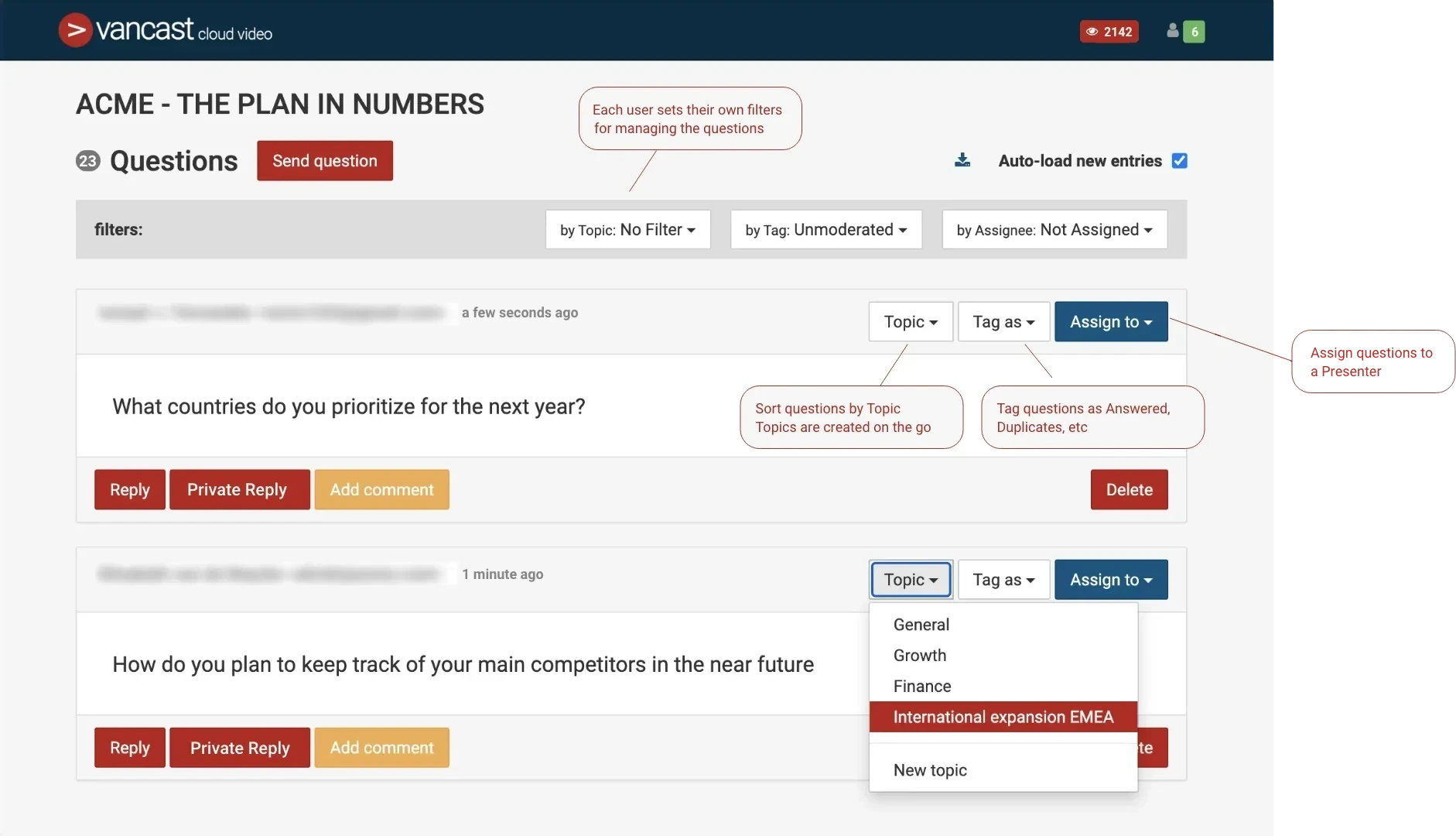
A moderation desk, not a chat box
| Typical webinar tool | Vancast | |
|---|---|---|
| Moderation | The host scrolls a chat or a single question list | A shared moderation console where several team members work the same queue in real time |
| Organization | Questions in arrival order | Filter by topic, tag and assignee; mark questions as duplicated, not a question or won’t answer |
| Answers | Read aloud, or typed back into the chat | Answered live on stage and marked as answered, or answered in writing in the viewer’s own tray, without leaving the event; internal comments let the team help the presenter with the answer |
| Audience view | One chat window for everything | A tray with the full question feed, each viewer’s own questions and answers, and a chat; you choose which tabs each event shows |
| After the event | A chat export, if any | Downloadable question list with your filters applied, plus Q&A insights in the analytics |
Give your presenters only the questions that matter
Team workflow
Assign questions to the right expert, tag them by topic and track what is unmoderated, answered or set aside. Internal comments let the team help the presenter with the answer.
Questions on stage, on screen and on demand
Mark a question when it goes to the speaker: it can appear on viewers’ screens, is flagged as answered live, and becomes a cue point in the on-demand version.
Moderation per session
Every session has its own Q&A queue, so parallel rooms and multi-day events stay organized.
Q&A insights
Export every question after the event and see which topics drew the most interest.
More reasons to choose Vancast over a webinar tool
See the Q&A console in a live demo
A 30-minute demo, tailored to your events and audience.